




Modo Training
Modo Training Videos!!
![Instant 3D Turntable for LightWave Users [cw]](https://www.liberty3d.com/wp-content/plugins/wp-cart-for-digital-products/lib/timthumb.php?src=https://www.liberty3d.com/wp-content/uploads/2015/12/Screen-Shot-2015-12-15-at-5.38.22-PM.png&h=125&w=125&zc=1&q=100)
![MODO 701 Modeling Tools-Volume #9- UV Mapping a Human [AG]](https://www.liberty3d.com/wp-content/plugins/wp-cart-for-digital-products/lib/timthumb.php?src=http://www.learn3dsoftware.com/Modo_701_Modeling_Tools_Vol_9_Product_Shot_400pix.jpg&h=125&w=125&zc=1&q=100)
![Modo 701- Modeling Tools- Volume #8- Topology II [AG]](https://www.liberty3d.com/wp-content/plugins/wp-cart-for-digital-products/lib/timthumb.php?src=http://www.learn3dsoftware.com/Modo_701_Modeling_Tools_Vol_8_Product_Shot_400pix.jpg&h=125&w=125&zc=1&q=100)



Lightwave Titles


![Instant 3D Turntable for LightWave Users [cw]](https://www.liberty3d.com/wp-content/uploads/2015/12/Screen-Shot-2015-12-15-at-5.38.22-PM.png)
Build Instant 3D turntables and navigable rooms and buildings using the free version of Unity 5 and LightWave3D.
![MODO 701 Modeling Tools-Volume #9- UV Mapping a Human [AG]](http://www.learn3dsoftware.com/Modo_701_Modeling_Tools_Vol_9_Product_Shot_400pix.jpg)
MODO 701 Modeling Tools-Volume #9- UV Mapping a Human [AG]
In this ninth volume of 12 volumes 3D Instructor Adam Gibson demonstrates how to get started using Modo 701's UV Mapping tools. This course starts off familiarizing the student with UV mapping basics/concepts and the Modo User Interface (UI). Then to finish things off a fully detailed Project Session commences where a Human Female model is UV Unwrapped and the UV Map is edited using Modo's powerful UV Editing Tools. A great tutorial for beginners to start learning how UV Map 3D models for Surfacing and Texturing. Table of Contents for Volume #9- UV Mapping a Human: Chapter 1- Intro, Chapter 2- UV Orientation in Modo, Chapter 3- Adding an Image to Paint on with a UV Map, Chapter 4- Adding Premade Images to Paint on with a UV Map, Chapter 5- UV Unwrap by Edge Selection, Chapter 6- UV Unwrap by Material/Surface, Chapter 7- Blocking Out Initial UV Islands on Human Model, Chapter 8- UV Seam Edge Selection on Human Model, Chapter 9- UV Unwrap Test and UV Check, Chapter 10- UV Unwrap Tool Settings Fixes, Chapter 11- UV Map Editing and Final. Running Time: 4 hrs. 18 mins. Resolution: 1920 x 1080 pixels, Video Format: MP4 Video (.mp4), Level: Beginner.![Modo 701- Modeling Tools- Volume #8- Topology II [AG]](http://www.learn3dsoftware.com/Modo_701_Modeling_Tools_Vol_8_Product_Shot_400pix.jpg)
Modo 701- Modeling Tools- Volume #8- Topology II [AG]
In this eighth volume of 12 volumes 3D Instructor Adam Gibson demonstrates how to get started using Modo 701's powerful Topology tools. Retopology is a very powerful method to generate clean and optimized meshes for any piece of 3D software and work pipeline. Cleaner meshes means: 1) Less UV Stretching/Errors, Cleaner Texture Maps, Characters that are easier to Rig and Animate (better deformations), and less render errors/artifacts.
This project based tutorial will guide through the techniques and concepts of retopologizing your own 3D models by demonstrating on a Parasaurolophus Dinosaur.
This series is great for beginner 3D students or if you new to Modo and want to learn your way around Modo quickly.
Table of Contents for Modeling Tools Volume #8
Chapter 1- Intro
Chapter 2- Retopology Concepts
Chapter 3- Background Mesh Set-Up
Chapter 4- Eye Socket Loop Creation
Chapter 5- Eye Area Creation
Chapter 6- Ear Socket Area Creation
Chapter 7- Nostril Area Creation
Chapter 8- Initial Mouth Loop Creation
Chapter 9- Connect Upper Mouth and Nostril Retopology Sections
Chapter 10- Lower Jaw Creation
Chapter 11- Connect Mouth and Eye, Chapter 12- Connect Eye and Ear, Chapter 13- Lower Head Creation, Chapter 14- Horn Base Loop Creation, Chapter 15- Back of Head Creation, Chapter 16- Horn Creation, Chapter 17- Neck Creation, Chapter 18- Mirror Head and Final. Running Time: 3 hrs. 2 mins., Resolution: 1920 x 1080 pixels, Video Format: MP4 Video (.mp4), Level: Beginner.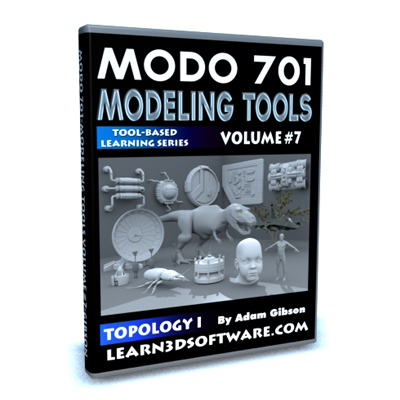
Modo 701-Modeling Tools-Volume #7-Topology I
In this seventh volume of 12 volumes 3D Instructor Adam Gibson demonstrates how to get started using Modo 701's powerful Topology tools. Retopology is a very powerful method to generate clean and optimized meshes for any piece of 3D software and work pipeline. Cleaner meshes means: 1) Less UV Stretching/Errors, Cleaner Texture Maps, Characters that are easier to Rig and Animate (better deformations), and less render errors/artifacts. This series is great for beginner 3D students or if you new to Modo and want to learn your way around Modo quickly. Table of Contents for Modeling Tools Volume #7: Chapter 1- Intro, Chapter 2- What is Topology and Retopology?, Chapter 3- How to Set-up Your Model for Retopology, Chapter 4- New Pen Tool Vs Old Pen Tool, Chapter 5- Topology Pen-Move Mode (Part One), Chapter 6- Topology Pen-Move Mode (Part Two), Chapter 7- Topology Pen-Move Mode with "Edge Loop" or "Slide Edge" selected, Chapter 8- Topology Pen- Duplicate Mode, Chapter 9- Topology Pen- Delete Mode, Chapter 10- Topology Pen- Delete Edge Loop, Chapter 11- Topology Tweak Tool, Chapter 12- Topology Sketch Tool, Chapter 13- Edge Slice Tool, Chapter 14- Add Loop Tool, Chapter 15- Bridge Tool, Chapter 16- Contour Tool, Chapter 17- Smooth Tool, Chapter 18- Convert to Triangles, Chapter 19- Convert to Quadrangles, Chapter 20- Grow Quads Tool, Chapter 21- Subdivide Tool and Final. Running Time: 1 hrs. 54 mins., Resolution: 1920 x 1080 pixels, Video Format: MP4 Video (.mp4), Level: Beginner.
Modo 701 Modeling Tools- Volume #6
In this sixth volume of 12 volumes 3D Instructor Adam Gibson demonstrates how to get started using Modo 701 powerful modeling tools. This series is great for beginner 3D students or if you new to Modo and want to learn your way around Modo quickly. Table of Contents for Modeling Tools Volume #6: Chapter 1- Intro, Chapter 2- Edge Slide Tool, Chapter 3- Add Loop Tool, Chapter 4- Add Point Tool, Chapter 5- Spin Quad Pairs Tool, Chapter 6- Collapse Edges Tool, Chapter 7- Remove Edges Tool, Chapter 8- Edge Split Tool, Chapter 9- Grow Quads Tool, Chapter 10- Fill Quads Tool, Chapter 11- Join Edges Tool, Chapter 12- Edge Bevel Tool, Chapter 13- Final. Running Time: 2 hrs. 3 mins., Resolution: 1920 x 1080 pixels, Video Format: MP4 Video (.mp4), Level: Beginner.
MODO 701 Modeling Tools-Volume #5
In this fifth volume of 12 volumes 3D Instructor Adam Gibson demonstrates how to get started using Modo 701 modeling tools. This series is great for beginner 3D students or if you new to Modo and want to learn your way around Modo quickly. Table of Contents for Modeling Tools Volume #5: Chapter 1- Intro, Chapter 2- Selection Modes and Options, Chapter 3- Lasso Style Select Modes, Chapter 4- Material Selection Mode, Chapter 5- Connected Selection, Chapter 6- Invert Selection, Chapter 7- Loop Select, Chapter 8- Close Loop Select, Chapter 9- Grow and Shrink Select, Chapter 10- More and Less Select, Chapter 11- Next and Previous Loop, Chapter 12- Final. Running Time: 1 hrs. 36 mins., Resolution: 1920 x 1080 pixels, Video Format: MP4 Video (.mp4), Level: Beginner.
MODO 701 Modeling Tools-Volume #4
In this fourth volume of 12 volumes 3D Instructor Adam Gibson demonstrates how to get started using Modo 701 modeling tools. This series is great for beginner 3D students or if you new to Modo and want to learn your way around Modo quickly. Table of Contents for Modeling Tools Volume #4: Chapter 1- Intro, Chapter 2- Capsule Tool, Chapter 3- Arc Tool, Chapter 4- Smooth Shift Tool, Chapter 5- Extrude Tool, Chapter 6- Vertex Bevel Tool, Chapter 7- Vertex Extrude, Chapter 8- Set Position Tool, Chapter 9- New Vertex Tool, Chapter 10- Center All Axis Tool, Chapter 11- Center Tool, Chapter 12- Remove Vertice Tool, Chapter 13- Split Tool, Chapter 14- Merge Vertices Tool, Chapter 15- Drag Weld Tool, Chapter 16- Final. Running Time: 2 hrs. 00 mins., Resolution: 1920 x 1080 pixels, Video Format: MP4 Video (.mp4), Level: Beginner.
Modo 701 Modeling Tools- Volume #3
In this third volume of 12 volumes 3D Instructor Adam Gibson demonstrates how to get started using Modo 701 modeling tools. This series is great for beginner 3D students or if you new to Modo and want to learn your way around Modo quickly. Table of Contents for Modeling Tools Volume #3: Chapter 1- Intro, Chapter 2- Taper Tool, Chapter 3- Twist Tool, Chapter 4- Bend Tool, Chapter 5- Vortex Tool, Chapter 6- Swirl Tool, Chapter 7- Push Tool, Chapter 8- Curve Extrude Tool, Chapter 9- Curve Clone Tool, Chapter 10- Clone Tool, Chapter 11- Array Tool, Chapter 12- SDS Subdivide Tool, Chapter 13- Final. Running Time: 2 hrs. 15 mins., Resolution: 1920 x 1080 pixels, Video Format: MP4 Video (.mp4), Level: Beginner.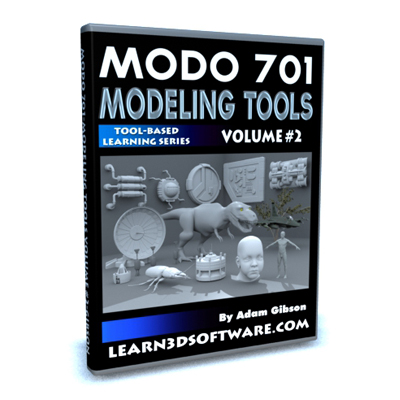
Modo 701 Modeling Tools- Volume #2
In this second volume of 12 volumes 3D Instructor Adam Gibson demonstrates how to get started using Modo 701 modeling tools. This series is great for beginner 3D students or if you are new to Modo and want to learn your way around Modo quickly. Table of Contents for Modeling Tools Volume #2: Chapter 1- Intro, Chapter 2- Element Move, Chapter 3- Bevel Tool, Chapter 4- Thicken Tool (Part One), Chapter 5- Thicken Tool (Part Two), Chapter 6- Mirror Tool, Chapter 7- Bridge Tool (Part One), Chapter 8- Bridge Tool (Part Two), Chapter 9- Slice Tool, Chapter 10- Curve Slice Tool, Chapter 11- Tack Tool, Chapter 12- Pen Slice Tool, Chapter 13- Loop Slice Tool, Chapter 14- Axis Slice Tool, Chapter 15- Final, Running Time: 2 hrs. 9 mins., Resolution: 1920 x 1080 pixels, Video Format: MP4 Video (.mp4), Level: Beginner
Modo 701 Modeling Tools- Volume #1
In this first volume of 12 volumes 3D Instructor Adam Gibson demonstrates how to get started using Modo 701 modeling tools. This series is great for beginner 3D students or if you new to Modo and want to learn your way around Modo quickly. Table of Contents for Modeling Tools Volume #1: Chapter 1- Intro, Chapter 2- Interface Tour, Chapter 3- Grid Options, Chapter 4- Primitives Intro, Chapter 5- Transform Tools Intro, Chapter 6- Create Mesh and Mesh Layers, Chapter 7- Edit Objects at Point, Poly, and Edge Level, Chapter 8- Final. Running Time: 2 hrs. 10 mins., Resolution: 1920 x 1080 pixels, Video Format: MP4 Video (.mp4), Level: Beginner.
Modo 601-Sub-D Modeling a Dinosaur-Project TRex
In this video tutorial 3D Instructor Adam Gibson teaches how to Sub-D model a dinosaur (Tyrannosaurus) from scratch using reference images. Modo has a vast amount of modeling tools to choose from and sometimes it can confusing which tools to use. Adam shows how to get great results by using a very small handful of tools. Demonstration of how to prepare reference images in a 2D editing program and importing them into Modo 601 is shown in great detail as well. Running Time: 10 hrs. 32 mins., Level: Beginner, Screen Resolution: 1920 x 1080 pixels, Format: MP4 Video (.mp4)
Modo 501 Modeling Tools Bundle Pack (Vol. #1,2,3,4,5,6,7,8)

Modo 501 Modeling Tools- Volume #8
In this eighth volume 3D Instructor Adam Gibson introduces the beginner Modo student to the basic modeling tools of Modo in an easy to understand series of mini tutorials. Running Time: 1 hrs. 8 mins.
Level: Beginner, Screen Resolution: 1920 x 1080 pixels, Format: MP4 Video (.mp4)

Tutorial Modo 501 Modeling Tools Volume #7
In this seventh volume 3D Instructor Adam Gibson introduces the beginner Modo student to the basic modeling tools of Modo in an easy to understand series of mini tutorials. Running Time: 1 hr. 6 mins., Level: Beginner, Screen Resolution: 1680 x 1050 pixels, Format: MP4 Video (.mp4)

Modo 501 Modeling Tools (Volume #6)
In this sixth volume 3D Instructor Adam Gibson introduces the beginner Modo student to the basic modeling tools of Modo in an easy to understand series of mini tutorials. Running Time: 1 hr. 10 mins., Level: Beginner, Screen Resolution: 1920 x 1080 pixels, Format: MP4 Video (.mp4)
Modo 501 Modeling Tools (Volume #5)
In this fifth volume 3D Instructor Adam Gibson introduces the beginner Modo student to the basic modeling tools of Modo in an easy to understand series of mini tutorials.
Table of Contents for Volume #5:
Chapter 1- Intro,
Chapter 2- Flex Tool,
Chapter 3- Twist Tool,
Chapter 4- Bend Tool,
Chapter 5- Vortex Tool,
Chapter 6- Swirl Tool,
Chapter 7- Push Tool,
Chapter 8- Sculpt Tool,
Chapter 9- Final.
Running Time: 1 hrs. 6 mins.,
Level: Beginner,
Screen Resolution: 1680 x 1050 pixels,
Format: MP4 Video (.mp4)
Modo 501 Modeling Tools (Volume #4)
In this fourth volume 3D Instructor Adam Gibson introduces the beginner Modo student to the basic modeling tools of Modo in an easy to understand series of mini tutorials.
Table of Contents for Volume #4
Chapter 1- Intro
Chapter 2- Element Move Tool
Chapter 3- Soft Move Tool (Part One)
Chapter 4- Soft Move Tool (Part Two)
Chapter 5- Soft Drag Tool
Chapter 6- Shear Tool
Chapter 7- Smooth Tool
Chapter 8- Final
Running Time: 1 hrs. 4 mins.
Level: Beginner
Screen Resolution: 1680 x 1050 pixels
Format: MP4 Video (.mp4)
Modo 501 Modeling Tools (Volume #3)
In this third volume 3D Instructor Adam Gibson introduces the beginner Modo student to the basic modeling tools of Modo in an easy to understand series of mini tutorials.
Table of Contents for Volume #3
Chapter 1- Intro
Chapter 2- Pen and Wall Tool (Part One)
Chapter 3- Pen and Wall Tool (Part Two)
Chapter 4- Elipsoid Tool
Chapter 5- Transform Tool
Chapter 6- SDS Subdivide Tool
Chapter 7- Extrude Tool: Polygon Mode
Chapter 8- Slice Tool
Chapter 9- Smooth Shift
Chapter 10- Thicken
Chapter 11- Center Selected Tool
Chapter 12- Final
Running Time: 1 hrs. 18 mins.
Level: Beginner
Screen Resolution: 1680 x 1050 pixels
Format: MP4 Video (.mp4)
Modo 501 Modeling Tools (Volume #2)
In this second volume 3D Instructor Adam Gibson introduces the beginner Modo student to the basic modeling tools of Modo in an easy to understand series of mini tutorials.
Table of Contents for Volume #2
Chapter 1- Intro
Chapter 2- Move Tool (Part One)
Chapter 3- Move Tool (Part Two)
Chapter 4- Rotate Tool
Chapter 5- Rotate Tool Pivot Point
Chapter 6- Scale Tool
Chapter 7- Axis Rotate Tool
Chapter 8- Uniform Scale Tool
Chapter 9- Solid Sketch Tool
Chapter 10- Curve Tool
Chapter 11- Draw Patch Tool (Part One)
Chapter 12- Draw Patch Tool (Part Two)
Chapter 13- Final
Running Time: 1 hrs. 12 mins.
Level: Beginner
Screen Resolution: 1680 x 1050 pixels
Format: MP4 Video (.mp4)
Mega-Uber Deal (Contains 55 Video Titles, 2 Texture Packs, 1 Model Pack)
The Mega-Uber Deal is a collection of 55 Video Tutorial Titles by Adam Gibson as well as 2 Texture Packs and 1 Model Collection. It contains 31-LightWave 3D titles, 12-3D Coat titles, 7-ZBrush titles, 4 Modo titles and 2-Photoshop titles. This offer will be available for a Limited Time only.Lightwave Titles
- Dinosaur Sub-D Modeling
- Dinosaur UV Mapping
- Spacecraft Modeling
- Surfacing for Beginners Volume #1
- Surfacing for Beginners Volume #2
- Surfacing for Beginners Volume #3
- Advanced UV Mapping Volume #1
- Advanced UV Mapping Volume #2
- Modeler Volume #1
- Modeler Volume #2
- Modeler Volume #3
- Modeler Volume #4
- Modeler Volume #5
- Modeler Volume #6
- Rigging a T-Rex with Skelegons
- Rigging a T-Rex with Bones
- Animating a Tyrannosaurus
- Sci-Fi Modeling-Interiors Hallways and Corridors
- LW CAD 3.6 Modeling Tools Volume #1
- LW CAD 3.6 Modeling Tools Volume #2
- LW CAD 3.6 Modeling Tools Volume #3
- LW CAD 3.6 Modeling Tools Volume #4
- LW CAD 3.6 Modeling Tools Volume #5
- LW CAD 3.6 Modeling Tools Volume #6
- Rigging a Human
- Animation Essentials-Vol. #1
- Animation Essentials-Vol. #2
- Camera Essentials
- ZBrush 3.1 for Lightwave Users-Volume #1-How to Paint Color
- ZBrush 3.1 for Lightwave Users-Volume #2-Normal Maps
- ZBrush 3.1 for Lightwave Users-Volume #3-Displacement Maps
- 3D Coat -StarFighter Detailing Volume #1 -Normal Maps
- 3D Coat -UV Mapping a StarFighter -Quick Method
- 3D Coat 3.5 for Lightwave Users-Photo Painting I
- 3D Coat 3.5 for Lightwave Users-Photo Painting II
- 3D Coat 3.5 for Lightwave Users-Painting Color
- 3D Coat 3.5 for Lightwave Users-Normal and Displacement Maps
- 3D Coat 3.5 for Lightwave Users-Voxel Sculpting:Project Dragon
- 3D Coat 3.5 for Lightwave Users-UV Mapping
- 3D Coat 3.5 for Lightwave Users-Retopology I
- 3D Coat 3.5 for Lightwave Users-Retopology II-Project Suchomimus
- 3D Coat 3.5 for Lightwave Users-Auto-Retopology
- ZBrush 4 for Lightwave Users-Painting Color
- ZBrush 4 for Lightwave Users-Normal Maps
- ZBrush 4 for Lightwave Users-Displacement Maps
- ZBrush 4- ZApp Link Plugin
- ZBrush 3.1 Creature Sculpting
- ZBrush 3.1 Creature Head Detailing
- ZBRUSH 3.5 -UV Unwrapping-"Mastering UV Master"
- Modo 501 Painting Color-The Essentials
- Modo 501 Modeling Tools(Volume #1)
- MODO 501-Retopology
- MODO 501-Dinosaur UV Mapping
- Photoshop CS4-Basic Training
- Photoshop CS4-Seamless Textures
- Creature Eye Packs- Volume #1
- 2D Sci-Fi Alpha Brush Collection Volume #1
- Dinosaur Mega-Pack (Over 40 Dinosaurs)

MODO 501-Painting Color -The Essentials
In this training video 3D Instructor Adam Gibson introduces the beginner Modo student to the basics of of how to paint color on your 3D objects in Modo in an easy to understand series of mini tutorials. Learn how to use the powerful painting tools to add color and life to your 3D creations. Topics also include: Individual Painting Tools and their properties, UV Maps, and Image Maps as applied to UVs. Approximately 2 hours of detailed training to get you up and started using Modo's powerful painting tools.
Running Time: 1 hrs. 50 mins.
Level: Beginner
Screen Resolution: 1440 x 900 pixels
Format: MP4 Video (.mp4)
Modo 401/501-Modeling Tools-Volume #1
*In this first volume 3D Instructor Adam Gibson introduces the beginner Modo student to the basic modeling tools of Modo in an easy to understand series of mini tutorials. Learn the hidden secrets of the basic primitives tools. 2.5 hours of detailed training to get you up and started using Modo's powerful modeling interface.
Running Time: 2 hrs. 33 mins.
Level: Beginner
Screen Resolution: 1440 x 900 pixels
Format: MP4 Video (.mp4)
Modo 401/501-Retopology
In this video tutorial 3D Instructor Adam Gibson demonstrates how to use the tools within Modo for Retopology of a creature head. Retopology of your 3D models has many advantages ranging from improved deformations during animation, more accurate UV Unwrapping, and improved Displacement/Normal Map Creation. Optimizing your mesh through retopology before attempting other phases of your work pipeline can be crucial to getting superior end results.
Running Time: 6hrs 59mins.
High Quality (Screen-Res 1440 x 900 pixels) Quicktime Video
Level: Beginner
Modo 401/501-UV Mapping a Dinosaur
In this Video Tutorial Modo Instructor Adam Gibson demonstrates the task of UV Mapping a Tyrannosaurus Dinosaur using Modo's Powerful UV Unwrapping Tools. Although Modo's UV Tools are extremely powerful there are still some tips and tricks to getting a great UV Map for your 3D Objects. Organic Objects like creatures and human style characters can create more challenges during UV Mapping so in this video we show how to get around those obstacles.
Topics Covered: How to Prepare your Mesh/Break Down your Model, How to Avoid Over-Lapping UV's, How to Use the UV "Unwrap Tool", and Problem Solving.
The techniques shown in this video can be applied to other UV Mapping Software as well. This tutorial can be done with Modo 401 or 501.
High Quality (Screen-Res 1440 x 900 pixels) Quicktime Video
Level: Beginner