




kat
Sale Extended: Half Price on the UberCam 4 + HyperCam Suite Through January 1st
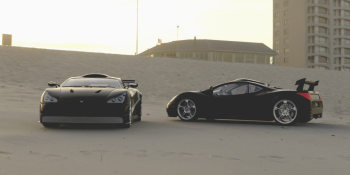
Good news if you missed it the first time around: we have extended the sale on the UberCam 4 + HyperCam suite. Use the coupon code UberCam4Evar! at checkout for 50% off the full bundle — $49.50 instead of $99 — now through January 1st, 2027. One bundle, the whole camera system: UberCam 4, HyperCam, the HyperCam Sensor, HyperLook, HyperDIT, and Mimic — every tool shares one license key, and every update is included. What’s new since you last looked The library has grown to 305 camera bodies and 354Read More
Mimic Is Here, and the Halloween Coupon Works on It Too
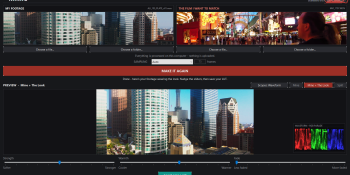
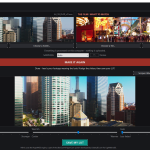
Meet Mimic, our new standalone Windows app for making your footage look like the film you love. Put your footage on one side, put the film you want to match on the other, and hit MAKE MINE LOOK LIKE THAT. Mimic studies the film, builds the look, and lets you preview it on your own footage before you save a standard 33-point .cube LUT you can use anywhere .cube LUTs are accepted. You get built-in scopes, too: waveform (RGB parade), histogram and vectorscope, right over the preview, so you canRead More
The Liberty3D Halloween Sale Is On — 25% Off, Plus a Treat

The Liberty3D Halloween Sale Is On! It’s that time of year again. From October 17 through November 1, take 25% off across the Liberty3D store’s sale range — training, tools and more — with one coupon code at checkout: L3DSpooky2026 Add your items to the cart, enter L3DSpooky2026 at checkout, and the 25% comes off every eligible item. No tricks — well, one treat: A Treat for Subscribers: the L3D WebM + WebP Savers, Free Our L3D WebM + WebP Savers for LightWave (regularly $9.99) save your renders and previewsRead More
LightWave3D Live Stream!
If you missed the live stream this morning, here is the link on youtube for you. Lots of really awesome stuff coming in LightWave3D 2027! Make sure you watch to the end.
UberCam 4 with HyperCam — the 1.2.60 update is live!
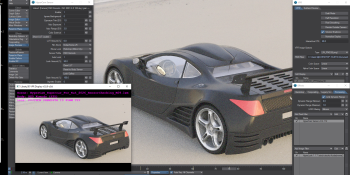
The new plugin update is available now: HyperCam 1.2.60 · UberCam 4.0.0.21 · HyperCam Sensor 0.4.112 · HyperLook 1.1.7 · HyperDIT 0.8.9. Owners: use Check for Updates in the HyperCam panel, or re-download from your account. What’s new Exposure envelopes in the panel — (E) buttons on ISO, Iris, and Shutter Angle. Keyframe exposure over time without leaving the panel; graph channels are now named ISO / Iris / ShutterAngle, and keys from older scenes are adopted automatically. Shutter Speed readout now tracks the Shutter Angle envelope at the currentRead More
UberCam 4 with HyperCam is Here!

After months of work, over a year of research, and nearly a 7-year hiatus from UberCam being upgraded, I’m excited to announce that UberCam 4 with HyperCam is now available. Now built for use with LW 2024 and up! Many of the classic cameras from the original 1.x to 2.6 UberCam releases are in this updated build making them compatible with use for modern LightWave3D. Some cameras had to be removed temporarily but are on their way back in and you will be automatically notified of an update via ourRead More
Independence Day 2026! 50% off until July 9th!

To help celebrate the 250th Anniversary Declaration of Independence of the United States of America, plus the birthday of our own beloved LightWave3D which is now 36 years young, and Liberty3D’s 17th year of operation, we decided to bring you a very special discount of 50% off practically everything in our store until July 9th (Kat’s Birthday!). Now with LightWave3D 2026 available to all upgraded users and Use the Coupon Code: L3DUSA250 at checkout in our store to apply the coupon once you have made your selections. We have some newRead More
Massive LightWave3D 2026 Presentation!

For those of you who missed it, all 5 hours and 55 minutes of awesomeness, you really need to check out the presentation LightWave Digital did on Saturday, May 2nd. So many things were demonstrated. You can watch the presentation below. If you don’t have the time for that, but want to know more about what was demo’ed, here is a very short list.Advanced Placement, MotoRig, 2D and 3D tracker system, Ocean, RIPR2, GODOT interchange, Construct enhancements, The New Fracture System, Asset Browser that does more than models, images, scenesRead More
Happy Easter! Get 35% off until April 16th!

Ah yes! It’s time again for our annual Easter Sale. Get 35% off almost everything in the store using the coupon code: L3DBunnySale2026We have been incredibly busy over the last 6 months and in some cases for almost a year. Kat has been on 3 different productions at once for example (thankfully, 2 of them have just finished). While we all eagerly await LW 2026 to drop, along with some other goodies in the works from other companies, as things get back to some kind of sanity in terms ofRead More
LightWave3D 2026 Technology Demo!

Yeah it’s 2 hours and almost 40 minutes long, but all the amazing stuff you want is in here plus more! LOTS MORE. Watch it, especially the last 20 minutes!!!
LightWave3D 2025.0.4 Now available in your accounts + LW 2026 previews!

That was a really fun presentation this morning from LightWave Digital regarding LW 2026 news, functions and features! In case you missed the live stream of the 2 hour session discussing all the new goodies coming in LightWave3D 2026, plus fixes now found in the patch for LightWave3D 2025 (now at 2025.0.4) – then check it out here.You should also know that, as promised during the live stream, the patch for 2025 is now available in your accounts. Go and log in at www.lightwave3d.com and grab it. LightWave3D has really turnedRead More
January bleh…but…

It’s almost time for the LightWave3D 2026 open beta to begin! While we don’t directly have any other information at this time as to the exact start date, we have a pretty good feeling that this Saturday, January 31st, during the live youtube stream scheduled for 10AM PST (6PM GMT/London) for LightWave digital, things will begin to heat up. And just in time too, as we are all freezing our tails off here in North America as Snowmagedon passes over 260+ Million people. While we are digging out from underRead More
It’s time for our Christmas and New Years sale!

(SALE EXTENDED! Coupon is: L3DChristmasSale2025 – Now good until January 10th) Season’s Greetings from your friendly citizens of Liberty3d.com. We hope everyone is doing well, getting eggnog, and staying warm this Christmas. Looking back over the last year, we have had a lot of exciting developments take place in LightWave land. 2025 hit and we were greeted with several new tools and patches along the way. This year coming up promises to be rather special with LightWave3D 2026, entering Open Beta sometime in January or early February. We will beRead More
Practical Production Techniques Vol. 27 – Ice Terrain

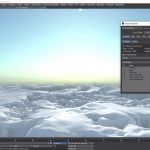
Practical Production Techniques Vol 27 – Ice Terrain is a practical exploration and implementation of an arctic landscape, using LightWave3D’s legendary, incredibly powerful and procedural texturing system for use in displacements to generate ultra-realistic imagery. Running at 2h52m, this is a fantastic video for anyone who uses LightWave3D, from beginner to expert production level artists. Kat walks you through everything you need to know to get your brain wrapped around this process and methodology, including the texturing of snow and “rock face” exposed through the tundra. This video provides theRead More
Weekly LightWave3D Presentations

It’s good to see LightWave Digital doing the weekly LightWave3D Presentations, especially with the recent Black Friday Promotion at www.lightwave3d.com. Deals are to be had, and while certain upcoming tech is being held close to the chest for good reason, we have caught a sneak peek on some fascinating stuff. You can see that they have 3 live stream presentations scheduled on their official youtube channel which you can find here, along with the presentations from the past couple of weeks. https://www.youtube.com/@OfficialLightWave3D/streams We highly suggest everyone subscribe and sit inRead More
LightWave 2025.0.3 Update and some thoughts…

It seems like we just did a post about the LW 2025.0.2 update, but now here we are, late to the party. Still, we wanted to do a post about it, letting people know that the LightWave 2025.0.3 update was posted to our accounts at lightwave3d.com a little over a week ago, just incase you missed it.For those of you interested in getting the change log, here it is. https://docs.lightwave3d.com/2025/2025-change-log.htmlI have to stress however, that the change log is a bit confusing as there are a lot of updates toRead More
LightWave3D 2025.0.2 is out now!

That was fast! Just released, very early Saturday morning on the 14th of June. LightWave3D 2025.0.2 hit all registered LW 2025 users accounts.You can grab the update by logging in to your accounts at www.lightwave3d.com. For those of you interested in the change log details, you can check them out here. https://docs.lightwave3d.com/2025/2025-change-log.htmlThe LightWave Digital Development team seems to be moving at a very rapid pace. With LightWave 2025 hitting accounts on May 4th, and then 2025.0.1 arriving a little more than a week or so later, and now in theRead More
Practical Production Techniques Vol. 26 – “Damage Vol. 2”

Kat is back with another installment in the Practical Production Techniques series with a sequel to Volume 25 “Damage”, now in Volume 26, Damage Volume II, this video picks up, and continues on with several concepts covered in the first “Damage” video but specifically covers in more depth and detail, LightWave Modeler’s fracture tool, how to use it, how to avoid its pitfalls and what to do when it produces sub-optimal result.The tutorial goal is to build out a destroyed object for crashing a spaceship into it (included in thisRead More
Practical Production Techniques Vol. 25 – DAMAGE!

Practical Production Techniques Volume 25 – “Damage” is a fantastic video for anyone looking to get their head wrapped around how to destroy and smash or crash something in a project setting. Kelly “Kat” Myers, takes you through the process of wrecking a Chrysler 300c sedan, using an array of tools, new and old, via techniques pulled from all forms of projects he’s worked on in the past.From conventional modeler tools used to morph and fracture, to new tools including Metamorphic, the New Displacement Brush (LW2025), and even Chronosculpt toRead More